
Is Your Home as Safe as You Think? A 2026 Home Security System Review
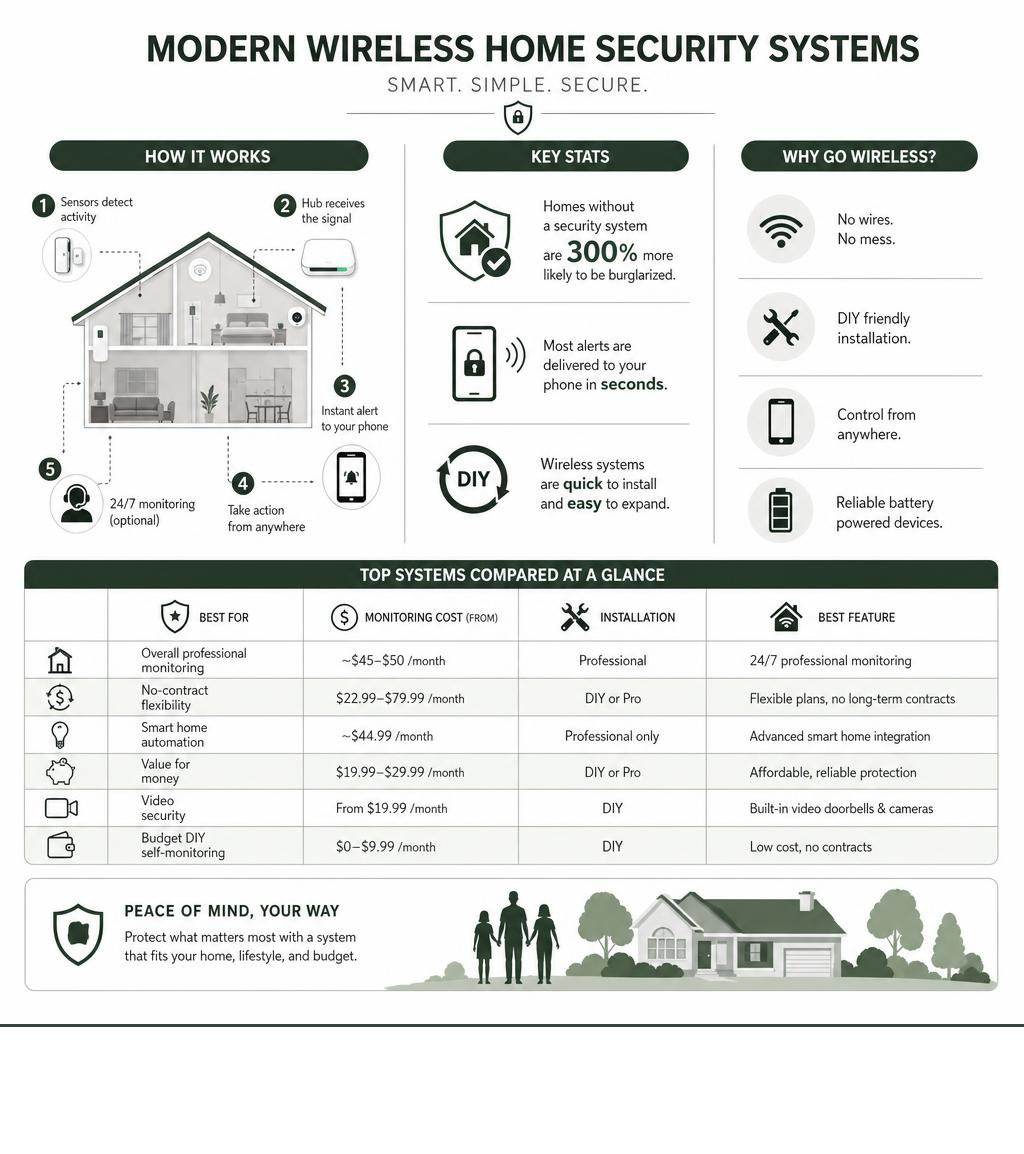
Reading a home security system review before you buy could be one of the smartest decisions you make this year. Here’s why: homes without a security system are 300% more likely to be burgled – and yet choosing the right system can feel overwhelming with so many options on the market.
Quick answer: Home security system types compared at a glance
| System Type | Best For | Monitoring Cost | Installation |
|---|---|---|---|
| Professionally monitored security system | Overall professional monitoring | ~$45-50/month | Professional |
| Flexible no-contract alarm system | No-contract flexibility | $22.99-$79.99/month | DIY or Pro |
| Smart home security system | Smart home automation | ~$44.99/month | Professional only |
| Value-focused monitored system | Value for money | $19.99-$29.99/month | DIY or Pro |
| Video-focused alarm system | Video security | From $19.99/month | DIY |
| Budget DIY self-monitoring system | Budget DIY self-monitoring | $0-$9.99/month | DIY |
Gone are the days when installing a security system meant a technician drilling holes through every wall and snaking wires to each sensor. Today’s systems are wireless, app-controlled, and often installable in an afternoon.
But which system is right for you depends on a few key questions:
- Do you want to monitor it yourself or pay for 24/7 professional monitoring?
- Are you a homeowner or renter?
- How much are you willing to spend upfront versus monthly?
Whether you’re on the Gold Coast protecting a family home, managing a rental property, or just looking for better peace of mind, this guide breaks it all down clearly.
Basic Home security system review vocab:
Understanding Your Options: DIY vs. Professional Systems
When you dive into any modern home security system review, you will quickly notice that the market has split into two main pathways: Do-It-Yourself (DIY) setups and professionally managed systems. Deciding which route to take depends entirely on your budget, your technical confidence, and how much hands-on control you want to have over your home’s safety.
Recent data highlighted in Consumer Reports’ evaluation of top systems shows that the lines between these categories are blurring. Many DIY systems now offer optional professional monitoring with no long-term contracts, while traditional professional systems are starting to offer DIY-friendly hardware kits.
The core differences lie in two main areas: installation and monitoring.
DIY systems are designed for quick, tool-free setup. They rely heavily on wireless sensors and adhesive backing, making them incredibly popular for renters or those who move frequently. On the other hand, professionally installed systems are hardwired or permanently mounted by certified technicians who optimize sensor placement and ensure every corner of your property is covered.
When it comes to keeping watch, you can choose between self-monitoring (where you receive mobile app alerts and must call emergency services yourself) or 24/7 professional monitoring. In a professionally monitored setup, a dedicated monitoring center receives the alarm signal. If they cannot reach you to verify the emergency, they will immediately dispatch local authorities.
The industry average response time for monitored security systems is roughly 45 seconds. Many premium systems utilize cellular backup, meaning that even if an intruder cuts your internet connection or your neighborhood experiences a power outage, your system can still communicate with the dispatch center via cellular networks.
If you are looking for a straightforward, hassle-free way to protect your property without getting bogged down in complex configurations, we recommend exploring our curated list of easy-to-install security systems to find a setup that fits your lifestyle.
DIY Wireless Systems: A Flexible Home Security System Review
DIY wireless systems have completely revolutionized the home safety market over the last decade. Modern wireless alarm kits have made it possible to secure a home for a fraction of what traditional systems used to cost.
These setups rely entirely on wireless sensors that run on long-lasting batteries. Instead of drilling into your door frames and walls, you simply peel off an adhesive backing and stick the contact sensors and motion detectors exactly where you need them. This makes them highly renter-friendly, as you can pack up the entire system and take it with you when your lease ends without leaving a single mark on the property.
Control is centralized through a user-friendly mobile app on your smartphone. Whenever a door opens or motion is detected, you receive an instant push notification. For those who choose self-monitoring, this means you are the primary line of defense.
While self-monitoring saves you from paying ongoing monthly fees, it does come with a major catch: if you are in a meeting, sleeping, or out of cellular service range, you might miss a crucial alert during an active break-in.
Professionally Monitored Systems: A Traditional Home Security System Review
For absolute peace of mind, traditional professionally monitored systems remain the gold standard. When you choose professional monitoring, you are paying for a continuous safety net.
If a sensor is triggered, the alarm goes directly to a manned 24/7 dispatch center. Trained operators will attempt to contact you to rule out a false alarm. If you do not answer, or if you confirm there is an emergency, they will contact the police, fire brigade, or medical services on your behalf.
This rapid response can make a massive difference in critical situations. Furthermore, professionally installed systems are exceptionally reliable. Because they are configured by experts, you rarely have to worry about loose sensors falling off doors and triggering false alarms, or dead zones where wireless signals fail to reach the base station.
For homeowners who travel frequently or simply want the assurance that someone is always watching over their property, professional monitoring is well worth the investment.
Key Features to Evaluate in a Home Security System Review
Choosing the right equipment requires looking past the flashy marketing and focusing on the core hardware that actually keeps your home secure. A comprehensive home security system review should always evaluate the quality, sensitivity, and integration capabilities of the individual components.
Modern security setups are modular, meaning you can start with a basic package and add specialized sensors as your needs evolve. To help you plan your layout, we have put together an ultimate checklist for comparing home security systems, ensuring you don’t overlook critical entry points or environmental hazards.

Essential Hardware and Sensors
At the absolute minimum, any reliable home security system should include the following core components:
- The Base Station: The central “brain” of your system. It connects all your wireless sensors to your home internet network and communicates with your mobile app or monitoring service.
- The Keypad: Usually mounted near your main entryway, allowing you to arm and disarm the system manually using a secure PIN code.
- Contact/Entry Sensors: Two-piece magnetic sensors placed on doors and windows. When the door or window opens, the magnetic connection breaks, instantly triggering an alert.
- Motion Detectors: Infrared sensors designed to detect body heat and movement in large open spaces. High-quality motion sensors feature pet-immunity settings to prevent dogs or cats from setting off false alarms.
- The Siren: A high-decibel alarm (often 105dB or louder) designed to startle intruders and alert your household and neighbors to a security breach.
Beyond these basics, you can also integrate glass-break detectors, which listen for the specific acoustic frequency of shattering glass, and environmental sensors that monitor for smoke, carbon monoxide, water leaks, or extreme temperature drops.
Advanced Smart Integrations and Cameras
In 2026, a security system is only as good as its smart home integration. Modern systems seamlessly connect with IP cameras, smart locks, and voice assistants like Amazon Alexa or Google Assistant.
For instance, you can configure your system to automatically lock your front door and arm the security sensors when you leave a certain geographic radius, a feature known as geofencing. If you are shopping for surveillance gear, check out our top camera picks to see which models offer the best low-light performance and local storage options.
High-definition IP cameras with two-way audio allow you to speak directly to delivery drivers or warn off suspicious visitors. Combining these cameras with smart locks allows you to disarm the alarm and unlock the door remotely for trusted guests, giving you complete, keyless control over your property.
Comparing the Costs: Equipment, Monitoring, and Contracts
One of the most confusing aspects of buying a home security system is navigating the pricing structures. To make an informed decision, you must look at the total cost of ownership over a three-to-five-year period, rather than just the upfront equipment price.
According to an expert analysis of security system costs, monthly professional monitoring fees typically range from $15 to $53 per month. However, premium plans that include live video monitoring or interactive smart home controls can climb higher.
Here is how the costs break down between different types of systems:
| Cost Component | DIY Self-Monitored System | DIY Monitored System | Professional Contract System |
|---|---|---|---|
| Upfront Equipment | $150 – $400 | $200 – $600 | $0 – $1,500 (often financed) |
| Installation Fee | $0 (DIY) | $0 (Optional Pro: ~$129) | $99 – $199+ |
| Monthly Fee | $0 | $22.99 – $49.99 | $44.99 – $59.99+ |
| Contract Length | None | Month-to-month | 36 to 60 months |
| Warranty | 1 – 2 years | Limited (Lifetime with sub) | 120 days to Lifetime (with plan) |
Signing a long-term contract (typically 3 to 5 years) is a common way to lower your upfront equipment costs, as companies will often give you “free” hardware in exchange for a locked-in monthly service agreement. However, if you want to save money in the long run, paying for your equipment upfront and choosing a month-to-month monitoring plan is almost always more cost-effective.
Additionally, keep in mind that some local councils require homeowners to register their security systems and pay an annual alarm permit fee to prevent costly police dispatches on false alarms.
For those evaluating options across the globe, databases like Crime Grade analyze international locations such as Burleigh, TX, while SafeHome looks at regions like Miami, FL. However, here on the Gold Coast – from Burleigh Heads to Miami, Queensland – local regulations and licensing laws apply. Always check with our local Gold Coast authorities regarding permit requirements.
For general retail purchases, some consumers look at platforms like reviews of elenorra.com or broader customer support reviews. However, choosing a local, brick-and-mortar security professional ensures you always have reliable, face-to-face support.
What to Know Before Your Security System Installation
Before you begin mounting sensors or booking a technician, taking a step back to plan your installation strategy can save you hours of troubleshooting down the road. Proper sensor placement is vital to ensuring your system works flawlessly and avoids the dreaded headache of frequent false alarms.
For a smooth setup, we recommend reading through our guide on 5 things to know before your electronic security installation. It covers structural challenges, power requirements, and how to prepare your home for a new security network.

Here are the key steps to keep in mind:
- Map Out Your Entry Points: Walk around your home and identify the most vulnerable areas. Front doors, back doors, and ground-floor windows are a burglar’s preferred targets. Make sure every single one of these has a contact sensor.
- Strategic Camera Placement: Security cameras should be mounted high enough to prevent tampering, but angled to capture clear facial details. Avoid pointing cameras directly at reflective surfaces or bright streetlights, which can blind the lens at night.
- Test Before You Mount: Always pair your sensors with the base station while sitting at your kitchen table before sticking them to your walls. This ensures all components are communicating properly and saves you from climbing up and down ladders if a device fails to sync.
- Mind the Pets: If you have dogs or cats, place your motion detectors in corners at least 6 to 8 feet off the ground, and adjust the sensitivity settings to prevent your furry family members from triggering the alarm while you are at work.
- Understand Local Regulations: If you plan on setting up loud external sirens, be mindful of local noise ordinances.
If you are looking at local security resources on the Gold Coast, working with a dedicated, licensed locksmith who understands the unique coastal climate and architectural styles of our local suburbs will always yield the most secure results.
Frequently Asked Questions about Home Security Systems
Choosing a security system raises plenty of questions. Here are the answers to some of the most common concerns we hear from homeowners.
Is professional monitoring worth the monthly fee?
Yes, for the vast majority of people, professional monitoring is absolutely worth the investment. While self-monitoring is free, it relies entirely on your ability to see a phone notification instantly. If you are sleeping, driving, in an area with poor mobile reception, or simply away from your phone, an active break-in could go completely unnoticed. Professional monitoring provides a 24/7 safety net, ensuring emergency services are dispatched even when you are completely unreachable.
Can I use a home security system if I rent an apartment?
Absolutely. Modern DIY wireless systems are incredibly renter-friendly. Independent resources such as this DIY home security review for renters highlight how adhesive-mounted sensors can be installed without drilling holes or damaging paint. When your lease is up, you simply peel the sensors off the walls, pack them into a box, and reinstall them at your new property. Additionally, month-to-month monitoring plans mean you aren’t locked into a long-term contract if you need to move suddenly.
Do home security systems work during power outages?
Yes, provided you choose a system with robust backup power. High-quality base stations include a built-in rechargeable battery backup that can keep the core security sensors running for up to 24 hours during a blackout. Furthermore, systems equipped with cellular backup do not rely on your home Wi-Fi router to send alerts. They will automatically switch to cellular networks to communicate with the monitoring center until your power and internet are restored.
Conclusion
Securing your home is not a one-size-fits-all project. Whether you choose a highly customizable DIY system like the one covered in this independent 2026 DIY security system review (also reviewed in other regions such as the PCMag Middle East Edition), or a premium, professionally installed setup like the one discussed in this professional home security system review, the most important step is taking action to protect your loved ones and your property.
While wireless DIY kits offer fantastic flexibility, they cannot match the sheer reliability, integration, and physical strength of a professionally tailored security setup. That is where we come in.
At Palm Beach Locksmiths, we have been serving the Gold Coast, Tweed, Currumbin, Burleigh, Elanora, Tugun, Miami, and Northern NSW regions for over 40 years. As local security experts, we don’t just sell hardware; we design custom electronic security solutions that fit your home’s unique layout and your family’s lifestyle. From emergency 24/7 lockout assistance to installing advanced smart locks and high-definition surveillance systems, we are your trusted, one-stop security partner.
Ready to take your home security to the next level? Explore our professional CCTV camera installation services or contact our friendly team today to schedule a comprehensive home security assessment. Let us help you keep your home safe, sound, and secure for years to come.