
What You Need to Know Before Getting Electronic Security Installation
Electronic security installation is one of the smartest investments you can make to protect your home or business on the Gold Coast.
But before a technician shows up at your door, there are a few things worth knowing. The right preparation can mean the difference between a smooth, same-day setup and a costly, frustrating experience.
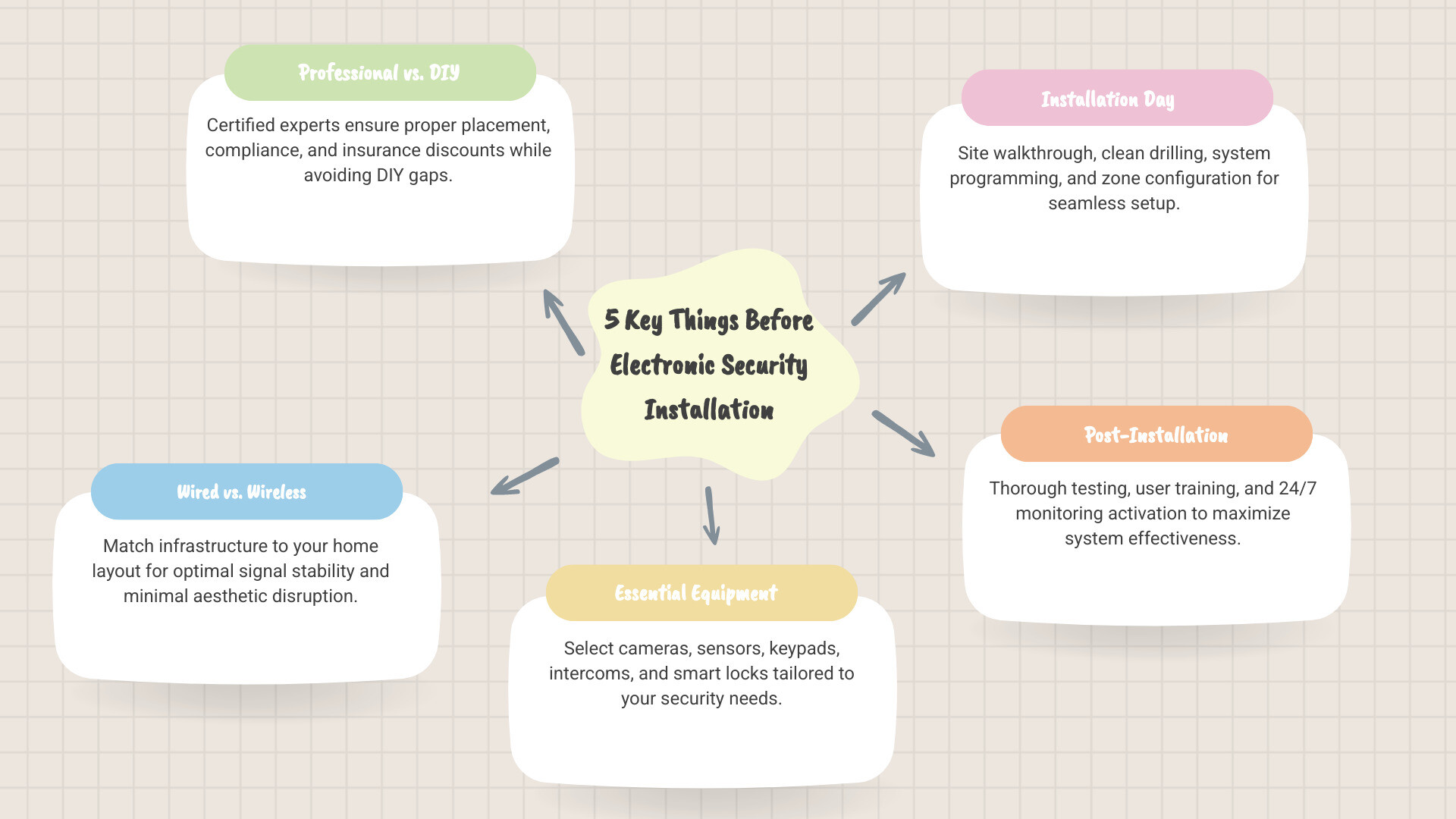
Here are the 5 key things to know before your installation:
- Professional vs. DIY – Certified installers reduce risk, ensure compliance, and often unlock insurance discounts
- Wired vs. Wireless – Your home’s layout and construction type will determine the best infrastructure
- What equipment you need – Cameras, sensors, keypads, intercoms, and smart locks all play different roles
- What happens on installation day – Expect a site walkthrough, clean installation, and system programming
- Post-installation steps – Testing, user training, and activating 24/7 monitoring are just as important as the install itself
Whether you’re securing a family home, a rental property, or a commercial premises, getting these fundamentals right from the start saves time, money, and stress.
1. Professional vs. DIY: Why Expert Electronic Security Installation Matters
In an era of “plug-and-play” gadgets, it is tempting to think that a weekend DIY project is enough to protect your family. However, when it comes to electronic security installation, the “do-it-yourself” route often leaves gaps that experienced burglars are quick to exploit.
At Palm Beach Locksmiths, we’ve seen how a poorly placed sensor or a weak Wi-Fi connection can render an expensive system useless. Professional installation isn’t just about mounting hardware; it’s about a comprehensive security assessment. Our certified technicians, often following guidelines from the Australian Security Industry Association (ASIAL), look for blind spots, weak entry points, and interference issues that a standard DIY manual won’t mention.
The Benefits of Going Pro
Choosing a professional service for your electronic security installation offers several high-value advantages:
- Insurance Discounts: Many Australian insurance providers offer premium reductions of 5% to 20% when a system is installed by a licensed professional.
- Liability Protection: If a DIY system fails during a break-in, you have little recourse. A professional installation comes with warranties and the assurance that the system meets local safety standards.
- 100% Satisfaction: We pride ourselves on ensuring the system works perfectly before we leave. This includes integrating modern solutions like Smart Lock Installation Gold Coast to ensure your physical and electronic security work in harmony.
- System Reliability: Professionals use pro-grade sensors and dual-path monitoring (cellular + internet) to ensure your alarm stays online even if the power goes out or a line is cut.

Comparison: Professional vs. DIY
| Feature | Professional Installation | DIY Installation |
|---|---|---|
| Expertise | Certified technicians with 40+ years of experience | Homeowner (variable skill level) |
| Equipment | Pro-grade, durable hardware | Consumer-grade “off-the-shelf” |
| Placement | Strategic, based on risk assessment | Often limited to easy-to-reach spots |
| Support | 24/7 monitoring and technical help | Self-troubleshooting via forums |
| Insurance | Eligible for significant discounts | Often ineligible for discounts |
| Reliability | High (hardwired or encrypted wireless) | Moderate (prone to Wi-Fi interference) |
2. Wired vs. Wireless: Choosing the Right Infrastructure
One of the most frequent questions we get during a consultation is whether to go wired or wireless. In 2026, both technologies are highly reliable, but the “best” choice depends entirely on your property’s layout in areas like Currumbin, Burleigh, or Miami.
Wired Systems: The Gold Standard for Stability
Wired systems are often preferred for new builds or extensive renovations where cables can be run through walls easily.
- Signal Stability: There is zero risk of signal interference from other household electronics.
- Power over Ethernet (PoE): Modern cameras often use PoE (Power over Ethernet), meaning a single cable provides both the internet connection and the power, reducing the need for nearby power outlets.
- Longevity: Wired components generally require less maintenance since you aren’t swapping out batteries every year.
Wireless Systems: Flexibility and Speed
Wireless electronic security installation has come a long way. It is the ideal choice for renters or owners of existing homes where drilling through heritage walls isn’t an option.
- Retrofit Ease: We can install a full wireless system in a fraction of the time it takes to wire a house.
- Expandability: If you decide to add more sensors later, it’s as simple as syncing a new device to the hub.
- Battery Backup: High-quality wireless systems include 24-hour backup batteries, ensuring protection during Gold Coast storms and power outages.
3. The Components of a Modern Electronic Security Installation
A truly secure property isn’t just an alarm; it’s an ecosystem of integrated devices. When we design a system, we look at how different components talk to each other to provide “layers” of protection.
- CCTV Camera Installation: High-definition cameras act as both a deterrent and a source of evidence. Most homeowners in our service area find that 3–4 cameras (doorbell, outdoor, and key indoor areas) provide excellent coverage.
- Intercom Installation Brisbane to Ballina: Intercoms allow you to verify visitors visually and audibly before granting access, which is essential for gated communities in Tugun or Elanora.
- Access Control Systems: Move beyond traditional keys. Use fobs, mobile credentials, or biometrics to manage who enters your property and when.
- Environmental Sensors: Modern electronic security installation can include flood and smoke detectors that alert the monitoring station immediately, potentially saving your home from fire or water damage.
Essential Hardware for Electronic Security Installation
To ensure your system is “future-proofed,” we focus on these core hardware pieces:
- The Control Panel: The “brain” of the system. We recommend centralized, touchscreen panels that are user-friendly but tucked away from plain sight from windows.
- High-Resolution Cameras: Look for at least 4K resolution and superior night vision to capture clear license plates or facial details.
- Glass Break Detectors: These are vital for homes with large windows or sliding glass doors, especially if you have large pets that might accidentally trigger a standard motion sensor.
- Smart Home Integration: A good system should talk to your lights and thermostats, allowing you to create “Away” scenes that make the house look occupied.
4. What to Expect During the Installation Visit
We know that having technicians in your home can be disruptive, so we aim for a “white-glove” service that respects your space and time. Most electronic security installations can be completed in a single visit, ranging from two to six hours depending on complexity.
The Step-by-Step Process
- The Site Walkthrough: Before we pick up a drill, we walk the property with you. We’ll discuss your daily routines, identify entry points, and map out exactly where each device will go.
- Infrastructure Check: We test your Wi-Fi strength and cellular signal to ensure your system has a rock-solid connection to the monitoring center.
- Clean Installation: Our team uses drop cloths, dust control measures, and clean drilling techniques. We ensure all wiring is discreet or hidden entirely.
- Privacy Boundaries: We are careful to respect your privacy. Cameras are positioned to cover your property without peeking into a neighbor’s yard or sensitive areas like bathrooms.
- Zone Naming: We’ll help you name your “zones” (e.g., “Back Patio Door” or “Garage Window”) so that when an alert pops up on your phone, you know exactly where the trouble is.
5. Post-Installation: Testing, Training, and 24/7 Monitoring
The job isn’t done just because the cameras are mounted. The most critical part of an electronic security installation happens once the hardware is in place.
User Training and Mobile Setup
We won’t leave until every member of your household feels confident using the system. This includes:
- Showing you how to arm and disarm the system via the keypad and the smartphone app.
- Setting up “Stay” modes (for when you’re home at night) and “Away” modes.
- Configuring notifications so you get real-time alerts if a door is opened or a camera detects motion.
- Explaining how to view livestream footage and playback recorded events.
Activating Monitoring After Your Electronic Security Installation
Professional monitoring is what turns a “noise-maker” into a life-saving system. Once activated, your system is connected to a 24/7 central station.
- Dispatch Protocols: If an alarm triggers, the monitoring team follows a strict protocol—verifying the alarm, contacting you, and then dispatching police or emergency services if needed.
- Rapid Response Times: While the industry standard is 45-60 seconds, many high-end systems we install achieve response times under 25 seconds.
- Dual-Path Monitoring: We often set up systems to use both your home internet and a dedicated cellular link. If a burglar cuts your phone line or the NBN goes down, the signal still gets through.
Frequently Asked Questions about Electronic Security Installation
How much does professional security system installation typically cost in 2026?
In 2026, costs have become more accessible due to technological advancements. A basic setup (3–5 sensors and a hub) typically ranges from $100–$200 for labor. A standard home setup (6–10 sensors plus 1-2 cameras) usually falls between $200–$400. For premium, comprehensive systems with 11+ sensors, multiple 4K cameras, and smart home integration, you can expect to pay between $400–$800 for the installation.
Will my pets trigger the motion sensors?
This is a common concern for pet owners on the Gold Coast. Modern electronic security installation uses “pet-immune” sensors. These are calibrated to ignore heat signatures and movement from animals under a certain weight—usually up to 25kg (60 lbs). We also use strategic placement, angling sensors so they “look” above the height where a dog or cat usually moves, ensuring your furry friends don’t cause false alarms.
How should I prepare my home for the installation?
To ensure a smooth, same-day installation, we recommend:
- Clearing Access: Ensure we can easily reach all windows, doors, and the area where the main control panel will be mounted.
- Wi-Fi Credentials: Have your network name and password ready so we can sync your cameras and smart devices.
- Deciding on Users: Think about who needs access (family, cleaners, or neighbors) so we can help you set up individual user codes during the training session.
Conclusion
Investing in a professional electronic security installation is about more than just buying gadgets; it’s about buying peace of mind. By choosing a local expert who understands the specific needs of the Gold Coast and Northern NSW region, you ensure your system is reliable, compliant, and easy to use.
At Palm Beach Locksmiths, we bring over 40 years of experience to every project. Whether you need a simple alarm or a complex Access Control System, our 24/7 mobile service is here to help. We are your trusted “one-stop” security provider, dedicated to keeping our community safe with competitive prices and 100% customer satisfaction.
Ready to secure your property? Contact us today for more info about our advanced security services.