
What Is an Access Control Key Fob? (Quick Answer)
An access control key fob is a small, electronic device that uses radio frequency (RFID or NFC) technology to unlock doors without a traditional metal key. When you hold it near a reader, it transmits a unique code — and if that code is authorised, the door opens.
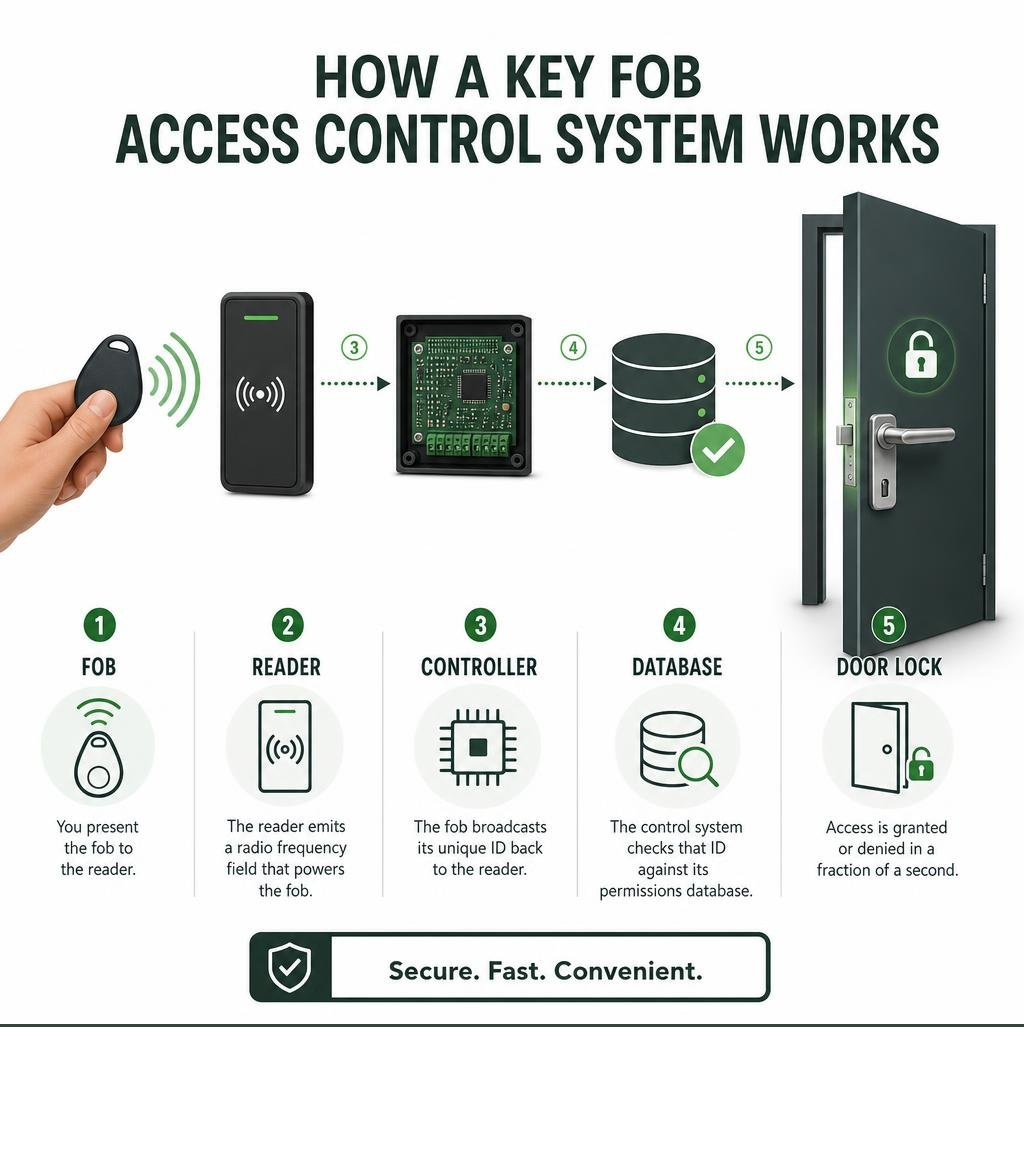
Here’s a quick summary of how it works:
- You present the fob to a reader mounted near the door
- The reader emits a radio frequency field that powers the fob’s chip
- The fob broadcasts its unique ID back to the reader
- The control system checks that ID against its permissions database
- Access is granted or denied in a fraction of a second
Key fobs are used in offices, apartment buildings, schools, and warehouses across the Gold Coast and beyond — anywhere you need to control who gets through which doors, when.
Whether you manage a commercial property or a residential complex, keeping the wrong people out — without making life difficult for the right people — is a constant challenge. Traditional keys get copied, lost, and handed around. Changing locks every time a staff member leaves is expensive and disruptive.
That’s exactly why so many Gold Coast property owners and managers are switching to key fob access control. The global access control market is projected to reach $18.4 billion by 2027, and it’s not hard to see why — these systems can reduce unauthorised access incidents by up to 70% compared to traditional lock-and-key systems.
This guide covers everything you need to know: how key fobs work, the different types available, what they cost, and how to choose the right system for your property.
Explore more about access control key fob:
What is an Access Control Key Fob and How Does It Work?
To understand how an access control key fob secures a door, it helps to look inside these compact plastic pucks. Inside every key fob is a tiny microchip and a copper wire antenna.
This hardware relies on Radio Frequency Identification (RFID) technology to communicate. Unlike a metal key that physically aligns pins inside a lock cylinder, a key fob communicates through invisible electromagnetic waves.
When you approach a locked door and hold your key fob close to the wall-mounted reader, a wireless conversation happens in milliseconds:
- The Reader Creates an Electromagnetic Field: The wall reader constantly emits a low-power, short-range radio frequency signal.
- The Fob Wakes Up: Because most key fobs are passive (they don’t contain a battery), they rely on the reader’s electromagnetic field for power. As soon as the fob enters this field, the copper antenna captures the energy and powers up the microchip.
- The Signal Transmission Occurs: Once powered, the microchip transmits its pre-programmed, unique identification code back to the reader.
- The Database Makes the Call: The reader sends this credential to the central access control panel. If the database shows that this specific fob is allowed to open this specific door at this exact time, the panel sends electrical power to release the door lock.
The Technology Behind the Access Control Key Fob
Not all key fobs operate on the same radio wave frequencies. Depending on your security needs and system design, your fobs will typically fall into one of three frequency categories:
- Low-Frequency (LF) RFID (125 kHz): This is the classic proximity technology that has secured buildings since the 1980s. It has a read range of about 2 to 5 cm. A classic example is the programmable T5577 Key Fob specifications, which is widely used for basic ID card emulation and entry control. While reliable, LF systems are generally unencrypted, meaning they are easy to clone with cheap, off-the-shelf tools.
- High-Frequency (HF) RFID (13.56 MHz): This frequency is used by modern “smart” credentials, including Near Field Communication (NFC). Because HF chips can store more data, they can run secure cryptographic algorithms. They prevent basic cloning and are perfect for high-security commercial doors, payment systems, and secure areas.
- Ultra-High-Frequency (UHF) RFID (860-960 MHz): Operating at a much longer range (up to 12 metres), UHF is perfect for vehicle gates, parking garages, and hands-free industrial access.
If you are feeling overwhelmed by terms like Wiegand, NFC, and RFID, don’t panic! You can brush up on the lingo in our guide to Access Control Systems Terms Demystified.
Key Components of a Proximity Entry System
A key fob is useless without the infrastructure supporting it. A complete proximity entry system relies on five main components working in harmony:
- The Key Fob (Credential): The physical token carried by the user.
- The Reader: The sensor mounted next to the door that reads the fob’s data.
- The Control Panel (Controller): The “brain” of the system, usually installed in a secure utility room. It receives read requests, processes them against access rules, and commands the locks.
- The Electronic Lock: This is either an electric strike (which replaces the standard door strike plate and releases the latch) or a magnetic lock (maglock, which uses a powerful electromagnet to hold the door shut).
- The User Database: The software backend where building managers add users, define schedule permissions, and track entry logs.
Types of Key Fobs and Credentials
When planning a security upgrade for your business or residential complex, you will find several physical formats and chip types on the market.
- Passive Fobs: These are the most common. They have no internal power source, meaning they are incredibly durable, lightweight, and can last decades without maintenance.
- Active Fobs: These contain a small internal battery. They can broadcast signals over longer distances (often used for vehicle access gates or specialized smart car keys).
- Smart Cards: These look like standard credit cards and operate on high-frequency RFID. They can handle advanced encryption and hold multiple credentials on a single chip.
A popular smart credential in legacy commercial systems is the NXP MIFARE Classic EV1 4K keyfob. It features a rugged, drop-resistant plastic shell and a generous 4 KB memory structure. However, because it uses older security protocols, security experts recommend migrating to newer high-security chips (like MIFARE DESFire EV3) for modern, high-risk deployments.
If you are managing a multi-story building, you might also want to look into how these credentials handle vertical transit. Check out how modern systems are managing this in our article on RFID in the Sky: How Elevator Access Cards Are Revolutionizing Building Security.
Comparing Key Fobs, Key Cards, and Mobile Credentials
Which format is best for your Gold Coast property? The table below highlights the key differences between the three main types of access credentials:
| Feature | Key Fobs | Key Cards | Mobile Credentials (Smartphone) |
|---|---|---|---|
| Form Factor | Small, rugged plastic puck that attaches to a keyring. | Credit-card-sized flat PVC card. | Digital pass stored in a smartphone app. |
| Durability | Extremely high. Resistant to drops, water, and pocket wear. | Moderate. Can snap, bend, or demagnetise in pockets or wallets. | Dependent on the user’s phone condition and battery. |
| User Convenience | High. Always attached to car keys, making it hard to forget. | Moderate. Fits in a wallet, but must be pulled out to scan. | Very high. Most people never leave home without their phone. |
| Cloning Risk | High (if unencrypted 125 kHz); Low (if encrypted smart fob). | High (if standard proximity); Low (if modern smart card). | Extremely low. Protected by phone biometrics and encryption. |
| Cost Per Unit | $10 to $50 depending on encryption levels. | $3 to $15 for standard cards. | Usually a monthly software fee per user; no physical hardware. |
Benefits and Limitations of Key Fob Systems
Like any security technology, electronic key fobs come with their own set of pros and cons. Understanding these will help you design a system that works for your specific daily workflow.
The Benefits
- Instant Remote Deactivation: If an employee leaves your company or a tenant loses their fob, you can log into the software and deactivate that specific credential instantly. There is no need to rekey locks or replace physical keys.
- Comprehensive Audit Trails: Every single tap is logged. You can see exactly who accessed the main office, the warehouse, or the gym, and at what time.
- Customisable Access Levels: You can program a single fob to open the front gate, the main door, and the server room, while restricting a general staff member’s fob to only open the front gate.
- Touchless, Hygienic Entry: Users simply tap or wave the fob near the reader, minimizing physical contact. Learn more about business solutions with Key Fob Entry Systems for Businesses.
- Operation Cost Savings: While the initial setup is an investment, you save thousands of dollars over time by avoiding emergency rekeying costs when physical keys go missing.
To see how a key fob system fits into a wider building security plan, read through A Comprehensive Guide to Security System Upgrades.
Security Vulnerabilities of an Access Control Key Fob
While a massive upgrade over physical keys, key fobs are not entirely invincible.
The biggest vulnerability lies in older, unencrypted 125 kHz proximity fobs. Because these chips transmit their unique ID in plain text, anyone with a cheap, hand-held cloner purchased online can copy the signal in seconds. If an unauthorized person gets their hands on your fob for just a brief moment, they can create a duplicate.
To understand how these exploits work and how to protect your property, you can read more about RFID Cloning and Security Risks.
Another limitation is credential sharing. A key fob cannot verify who is holding it. If an employee lends their fob to a friend, the system will log the employee as entering the building. For high-security doors, we recommend setting up two-factor authentication (such as requiring both a fob tap and a PIN code on a keypad).
Selecting, Installing, and Managing a Key Fob System
Setting up a robust key fob system is not a DIY job. It requires careful planning, professional installation, and proper software configuration to ensure the system is secure and compliant with local building and fire safety codes.

A professional installation always begins with a comprehensive site survey. We evaluate the physical door frames, power sources, and cable pathways. From there, we install the door controllers and program the system rules.
Modern commercial controllers can easily manage up to 20,000 users per controller, making it incredibly easy to scale your security as your business grows.
When choosing physical credentials, opting for industry-recognised standards like Standard Key Fobs for Access Control ensures long-term reliability and compatibility with a wide range of readers.
Additionally, if your building features multi-tenant elevators, you will need specialized configurations. We cover this process step-by-step in our guide on Mastering Elevator Access Control System Setup.
Programming and Deactivating Key Fobs
Managing a modern system is incredibly straightforward, thanks to user-friendly cloud-based management software.
When you purchase a rugged credential like the CAS-FOB – Access Control Key Fob, adding it to your system is a simple three-step process:
- Scan the Fob: Tap the new fob on an administrative USB reader connected to your computer.
- Assign to a User: Type the employee or resident’s name into the software database and link it to that fob’s unique ID.
- Set Permissions: Select which doors they can access and during what hours (e.g., Monday to Friday, 8:00 AM to 5:00 PM).
If that person loses their key fob, you simply find their name in the database, click “Revoke” or “Deactivate,” and the fob is instantly rendered useless.
Frequently Asked Questions about Key Fob Access Control
How much does a key fob access control system cost?
The total cost of a key fob entry system depends heavily on the number of doors you need to secure, the type of locking hardware required, and whether you choose a cloud-based or on-premise system.
On average, a professional installation for a standard commercial door costs between $500 and $800 per door (including the reader, controller, electronic lock, and cabling).
Individual physical credentials are quite affordable. You can browse various options, like those found on Fobs and Cards, which typically range from $10 to $50 per fob depending on the level of encryption and physical ruggedness.
Which industries benefit most from key fob entry?
Key fob systems are highly versatile and benefit a wide range of properties:
- Commercial Offices: To protect intellectual property, manage employee timesheets, and secure server rooms.
- Residential Apartments & Strata Properties: To secure main entries, common areas (like gyms and pools), and parking garages.
- Healthcare Facilities: To control access to medicine dispensaries, patient files, and restricted wards.
- Manufacturing and Warehouses: To keep untrained visitors away from dangerous machinery and track staff shifts.
If you are located on the Gold Coast or Northern NSW and want to secure your facility, check out our tailored Access Control Systems Gold Coast services.
Can a lost key fob be copied or cloned?
If your system uses older, unencrypted 125 kHz proximity fobs, yes, they can be easily cloned. However, if your system uses modern 13.56 MHz smart fobs with high-level encryption (such as MIFARE DESFire), cloning them is virtually impossible with standard commercial equipment.
For comparison, vehicle smart keys use incredibly sophisticated rolling codes to prevent cloning. You can read about how advanced vehicle smart keys manage access and security in the Model Y Owner’s Manual. For your commercial building, choosing encrypted smart fobs provides a similar, high-grade level of protection.
Conclusion
Upgrading to an access control key fob system is one of the smartest investments you can make for your Gold Coast property. It eliminates the headaches of traditional keys, gives you complete control over who enters your building, and provides a clear audit trail of all access events.
At Palm Beach Locksmiths, we have over 40 years of experience securing homes and businesses across the Gold Coast, Tweed, Currumbin, Burleigh, Elanora, Tugan, Miami, and Northern NSW. As your trusted, one-stop security provider, our 24/7 mobile locksmiths are always ready to design, install, and maintain the perfect electronic security system for your needs.
Ready to secure your property with a modern key fob system? Contact us today to explore our Access Control Systems and get a professional, competitive quote!