

Your Home Security System Might Be Letting You Down Without You Knowing
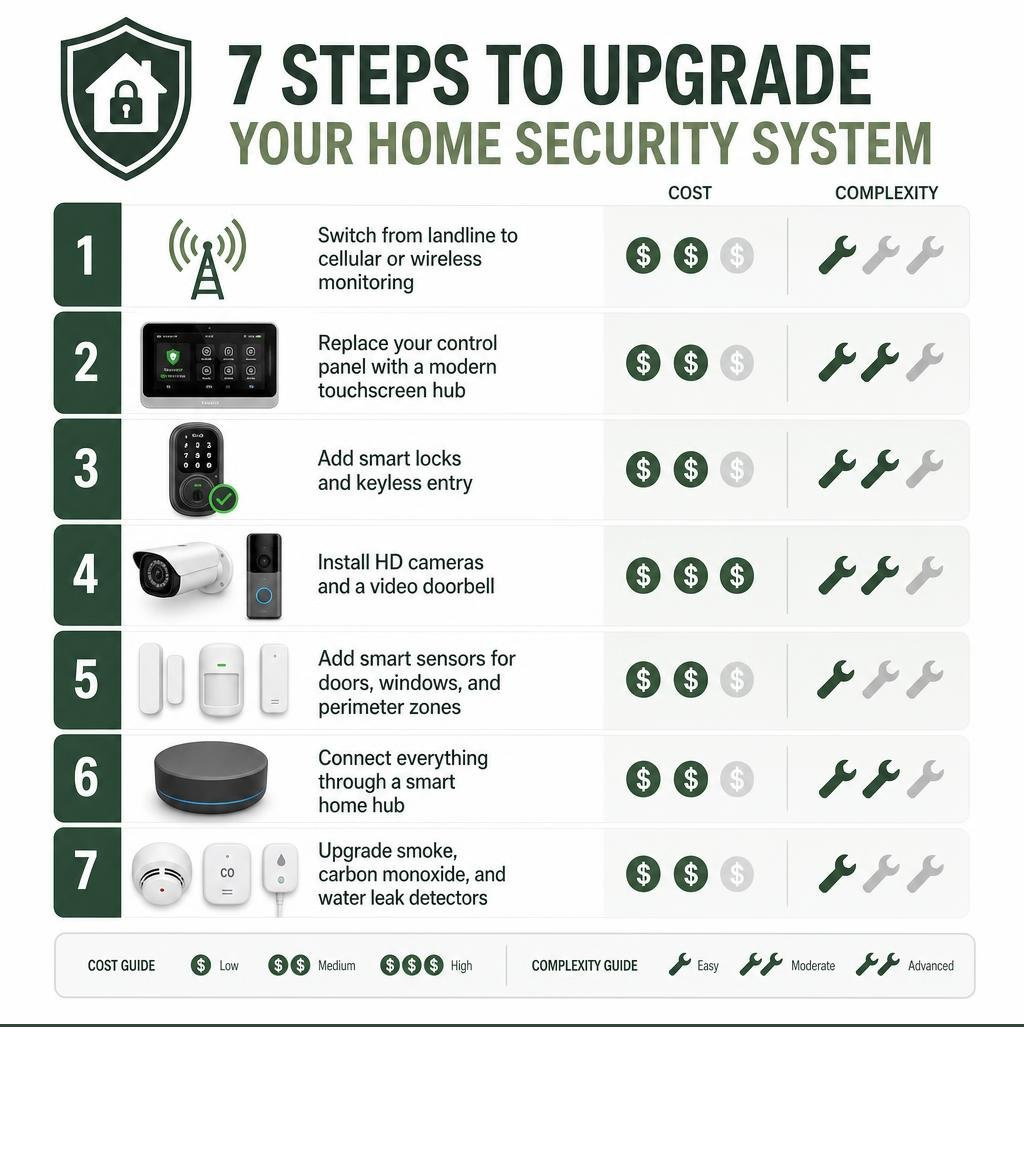
Knowing how to upgrade home security systems doesn’t have to mean ripping everything out and starting over. Here’s a quick overview of the most effective steps:
- Switch from landline to cellular or wireless monitoring
- Replace your control panel with a modern touchscreen hub
- Add smart locks and keyless entry
- Install HD cameras and a video doorbell
- Add smart sensors for doors, windows, and perimeter zones
- Connect everything through a smart home hub
- Upgrade smoke, carbon monoxide, and water leak detectors
Most of these can be done without replacing your entire system — and they can dramatically improve your protection.
Think about this: 34% of burglars don’t break in at all — they simply walk through an unlocked front door. And if your system is more than a few years old, it may be running on a landline that a burglar can cut in seconds, using cameras that barely capture a face, and missing smart features that modern systems treat as standard.
The average home security system lasts around 10 years — but the technology inside it can become outdated in as little as 5 to 7 years. Older panels often can’t connect to your phone. Sensors lose reliability. And landline-based monitoring leaves a gap that’s easy to exploit.
The good news? You probably don’t need to replace everything. Strategic, phased upgrades can bring an aging system up to modern standards — often at 30–60% less than a full replacement — by reusing your existing wiring and sensors while adding smarter components where it counts most.
Basic how to upgrade home security systems terms:
Is It Time to Upgrade? Signs Your Security System Is Outdated
It is easy to forget about your security system once it is installed. It sits quietly on the wall, and as long as it doesn’t make weird noises, we assume it is doing its job. But just like a smartphone from ten years ago would struggle to run today’s apps, an outdated security system leaves major vulnerabilities in your home defence.

Here are the most common signs that your existing system is overdue for a refresh:
- Landline Reliance: If your alarm system still dials out using a physical copper telephone line, it is incredibly vulnerable. A pair of wire cutters is all a burglar needs to silence your system before they even step foot inside.
- A “Dumb” Control Panel: If your keypad features physical rubber buttons, a tiny green LCD screen, and zero internet connectivity, you are missing out on modern remote access. You cannot arm or disarm it from your phone, nor can you receive real-time alerts.
- Frequent False Alarms: If your sensors trigger when the wind blows or when your pets walk by, the hardware is likely failing. Dust buildup, degraded circuitry, and old backup batteries are major causes of false alarms.
- Unsupported Hardware: If your system’s manufacturer has gone out of business or stopped updating the firmware, your system is vulnerable to software bugs and cybersecurity exploits.
- Low Video Resolution: If your existing security cameras capture grainy, pixelated footage where you cannot make out a license plate or a face, they are not doing their job.
If you are experiencing any of these issues, it is time to check out When to Upgrade Your Home Security System to understand the risks. Upgrading ensures your home remains a sanctuary rather than a soft target. For a deeper dive into what modern upgrades can do for you, read our A Comprehensive Guide to Security System Upgrades.
How to Assess Your Current Setup for Gaps
Before you start buying new gadgets, we recommend running a systematic audit of your existing setup. Here is how you can assess your home’s current security health:
- Test Every Door and Window Sensor: Put your system into “test mode” and walk around your home, opening every door and window. Verify that the control panel registers each opening instantly.
- Check Battery Health: Wireless sensors rely on batteries that generally last 3 to 5 years. If your sensors are older than 7 to 10 years, the internal components themselves may be degraded, regardless of fresh batteries.
- Identify Coverage Blind Spots: Walk your property boundary. Can someone approach your back door or side gates without being caught on camera or triggered by a motion sensor?
- Inspect Camera Quality: Look at your live feeds during the day and at night. Can you clearly see faces at your front door? If the night vision is blurry or obstructed by spiderwebs, your cameras need upgrading or repositioning.
- Look Up Your Panel Model: Open the main metal cabinet of your alarm system (usually hidden in a wardrobe or utility closet) and write down the brand and model number. This will tell you if your system can be upgraded with modern add-ons or if it is completely obsolete.
Upgrade vs. Replace: Choosing the Right Path for Your Home
One of the biggest questions we hear is: “Do I have to throw everything away and start from scratch?”
The answer is almost always no. If your home is pre-wired with high-quality copper wiring running to door and window sensors, that infrastructure is incredibly valuable. Hardwired sensors are faster, more reliable, and do not require battery replacements.
Let’s look at how upgrading your existing components compares to a complete system replacement:
| Feature/Factor | Upgrading Existing Components (Alarm Takeover) | Complete System Replacement |
|---|---|---|
| Average Cost | $300 – $900 (30–60% less than replacement) | $1,500 – $5,000+ (depending on home size) |
| Installation Time | 2 to 4 hours | 1 to 2 days of drilling and running wires |
| Device Reusability | Keeps existing wired sensors, sirens, and power lines | Discards all old hardware; installs brand-new gear |
| Smart Integration | Yes, via a new smart communicator or panel upgrade | Yes, fully integrated out of the box |
| Subscription Fees | Often lower; can transition to self-monitoring | Often tied to long-term high-fee contracts |
Choosing the right path depends heavily on your current system’s age and your security goals. To help you make the right choice, check out our Ultimate Checklist for Comparing Home Security Systems.
The Financial Benefits of an Alarm Takeover
An “alarm takeover” is when a security provider reprogrammes your existing, functional wired system to work with a modern panel or monitoring service. Because we do not have to spend hours climbing through your roof cavity to run new cables, you save massively on labour costs.
Beyond the immediate cost savings, reusing your solid copper wiring is environmentally friendly. It keeps plastic and electronic waste out of our local landfills while giving you a system that is far more reliable than cheap, battery-powered wireless kits.

How to Upgrade Home Security Systems: 7 Simple Modernization Steps
If you are ready to bring your home protection into the modern era, you do not have to tackle everything at once. By taking a phased approach, you can prioritize the upgrades that deliver the biggest security improvements first.

Here are the 7 simple ways to modernize your existing security system.
1. Swap Landlines for Cellular or Wireless Monitoring
The absolute first upgrade you should make is your system’s communication method. Traditional landlines are being phased out globally, and they are incredibly easy for an intruder to disable.
By installing an LTE cellular communicator or a Wi-Fi module inside your existing alarm panel, you bypass the telephone lines entirely.
- Dual-Path Reliability: The best setups use Wi-Fi as their primary connection for speed, with a cellular backup that kicks in instantly if your internet goes down or your power is cut.
- Instant Alerts: Instead of waiting for a central monitoring station to call your home phone, a cellular-enabled system sends push notifications directly to your smartphone within milliseconds of a sensor triggering.
2. Upgrade Your Control Panel to a Touchscreen Hub
Your control panel is the brain of your security system. If yours looks like a calculator from 1995, upgrading it to a sleek touchscreen hub will completely transform how you interact with your home security.
Modern touchscreen panels allow you to:
- Manage individual user codes for family members, cleaners, or guests.
- View live camera feeds directly from the screen.
- Check local weather updates and system diagnostics.
- Enjoy backward compatibility, meaning the new smart screen can still communicate with your old, reliable wired sensors.
3. Integrate Smart Locks and Keyless Entry
Statistic from earlier? Over a third of burglars walk right through the front door. Upgrading to a smart lock is one of the most effective ways to secure your home’s primary entry point.
With a smart lock, you can say goodbye to physical keys hidden under doormats. Instead, you can unlock your door via a PIN code, fingerprint scan, or your smartphone. You can also schedule temporary access codes that only work during specific hours—perfect for tradies or pet sitters.
If you want to ensure your smart lock is installed securely and functions seamlessly with your existing door hardware, take a look at our Smart Lock Installation Gold Coast service page.
4. Add High-Definition Security Cameras and Video Doorbells
Older security cameras are notorious for producing grainy, black-and-white footage that is useless to police. Modern security cameras have changed the game completely.
Today’s cameras offer:
- 4K Resolution & HDR: Clear, crisp footage even in direct sunlight or deep shadows.
- AI-Powered Detection: Advanced algorithms that can distinguish between a human, a vehicle, and a stray cat, eliminating annoying false alarms.
- Color Night Vision: High-powered spotlight cameras that turn night into day when motion is detected.
- Video Doorbells: A doorbell camera acts as your home’s front-line deterrent, allowing you to see, hear, and speak to visitors from anywhere in the world.
To explore your options for high-quality surveillance, check out our CCTV Camera Installation services.
5. Install Smart Sensors and Perimeter Protection
Modernizing your security isn’t just about cameras; it is also about the sensors that trigger your alarm. If you have older window and door sensors, consider upgrading them to smart, encrypted wireless sensors.
- Glass Break Detectors: Instead of waiting for a door to open, these sensors listen for the specific frequency of shattering glass, triggering your alarm before an intruder even steps inside.
- Dual-Technology Motion Sensors: These combine passive infrared (PIR) heat detection with microwave sensors, virtually eliminating false alarms from moving curtains or pets.
- Outdoor Beam Sensors: Create an invisible perimeter barrier along your fence line that alerts you the moment someone enters your yard.
6. Connect to a Centralized Smart Home Hub
An isolated security system is good, but an integrated smart home security system is incredible. By connecting your security panel to a smart hub like Apple HomeKit, Google Home, or Samsung SmartThings, you can create powerful automation rules.
Imagine this scenario: You arm your system to “Away” as you leave for work.
- Your smart locks automatically engage.
- Your smart thermostat lowers to save energy.
- All indoor lights turn off.
- Your outdoor cameras arm themselves and prepare to record.
If a camera detects motion at night, your system can automatically flood your garden with bright, smart LED lighting to scare off potential intruders.
7. Improve Fire and Environmental Protection
A home security system should protect your family from more than just human threats. Modernizing your system gives you the perfect opportunity to upgrade your environmental sensors.
- Smoke Detectors: The US Fire Administration and local safety authorities recommend replacing smoke detectors every 10 years. Modern, system-linked smoke alarms communicate with your control panel, meaning if a fire starts while you are away, your monitoring service can dispatch the fire brigade immediately.
- Water Leak Sensors: Placing small wireless water sensors near your hot water system, washing machine, or kitchen sink can save you thousands of dollars in water damage repairs by alerting your phone the second a leak is detected.
Ensuring Compatibility: Protocols and Smart Home Integration
When learning how to upgrade home security systems, compatibility is key. You don’t want to buy a beautiful new smart lock only to find out it won’t talk to your existing control panel.
Most modern security systems and smart home devices communicate using standardized wireless protocols. Understanding these protocols will help you build a seamless, reliable system.
Understanding Wireless Protocols for How to Upgrade Home Security Systems
- Z-Wave: A highly reliable, low-energy wireless protocol designed specifically for home automation. Z-Wave devices create a “mesh network,” where each device acts as a repeater, strengthening the signal across your home. It operates on a different frequency than Wi-Fi, meaning it won’t slow down your internet.
- Zigbee: Similar to Z-Wave, Zigbee is an open-source mesh network protocol used by many major brands (like Philips Hue). It is fast and highly efficient but shares the 2.4 GHz frequency band with your Wi-Fi, which can sometimes cause interference in crowded areas.
- Wi-Fi: Great for high-bandwidth devices like security cameras and video doorbells that need to stream video. However, Wi-Fi devices consume more battery power and can congest your home network if you have too many of them.
For a comprehensive guide on navigating these technologies, read How to Upgrade Your Existing Home Security System: A Smart Homeowner’s Guide for 2026.
DIY Upgrades vs. Professional Installation
With so many smart security products available on retail shelves, it is tempting to take the DIY route. But is it always the best option?
- DIY Upgrades: Perfect for modular, wireless additions. If you want to stick a wireless camera on your rental balcony or add a couple of adhesive door sensors, DIY is cost-effective and highly customizable.
- Professional Installation: Essential for hardwired systems, alarm takeovers, and complex programming. A professional installer ensures that your backup batteries are wired correctly, your motion sensors are positioned to avoid pet triggers, and your system complies with local safety standards.
When to Hire a Professional for How to Upgrade Home Security Systems
We highly recommend calling in a professional if:
- You are dealing with mains electrical wiring.
- You want to integrate your legacy wired sensors with a new smart panel.
- You need high-altitude camera mounting to capture clean, unobstructed angles.
- You want 100% reliable 24/7 professional monitoring with guaranteed fast emergency response times.
If you are located on the Gold Coast or Northern NSW, our team of licensed security experts is here to help. Explore our Residential Locksmith services to see how we can bring your system up to scratch.
Frequently Asked Questions About Security Upgrades
How often should I upgrade my home security system?
As a general rule of thumb, you should have your security system professionally evaluated every 5 to 7 years. While high-quality door and window sensors can last up to 10 or 15 years, the software, wireless protocols, and communication panels evolve much faster. Upgrading your core control panel within this timeframe ensures you remain protected against modern security vulnerabilities.
Can I upgrade my security system myself?
You can easily handle simple wireless upgrades, such as adding a DIY video doorbell or placing smart water leak sensors around your home. However, if your upgrade involves taking over an existing hardwired panel, rewiring a power supply, or integrating complex smart locks, it is highly recommended to hire a licensed professional to ensure your system remains completely reliable.
Will upgrading my security system lower my home insurance?
Yes! Many insurance providers offer premium discounts ranging from 5% to 20% for homes with upgraded security systems. To qualify for the best discounts, your system typically needs to feature professional 24/7 monitoring, UL-certified fire protection, and high-quality deadbolts on all entry doors.
Conclusion
Modernizing your home security doesn’t have to be an overwhelming or incredibly expensive project. By focusing on smart, strategic upgrades—like replacing an old landline connection with cellular monitoring, adding a video doorbell, or installing smart locks—you can breathe new life into your existing system while saving significantly compared to a full replacement.
At Palm Beach Locksmiths, we have been helping Gold Coast and Northern NSW homeowners protect what matters most for over 40 years. Whether you are in Currumbin, Burleigh, Elanora, Tugun, Miami, Tweed, or anywhere in between, our 24/7 mobile security experts are ready to design a customized upgrade plan that fits your budget and lifestyle perfectly.
Don’t wait for a security breach to find out your system is outdated. Contact us today via our Palm Beach Locksmiths Services page to schedule a professional security assessment and take your home’s protection to the next level.