

Why Video Doorbell Setup Matters for Your Home Security
Video doorbell setup is an effective way to boost home security and add daily convenience. It lets you monitor deliveries, screen visitors, and deter intruders, acting as a security camera and smart intercom for your front door.
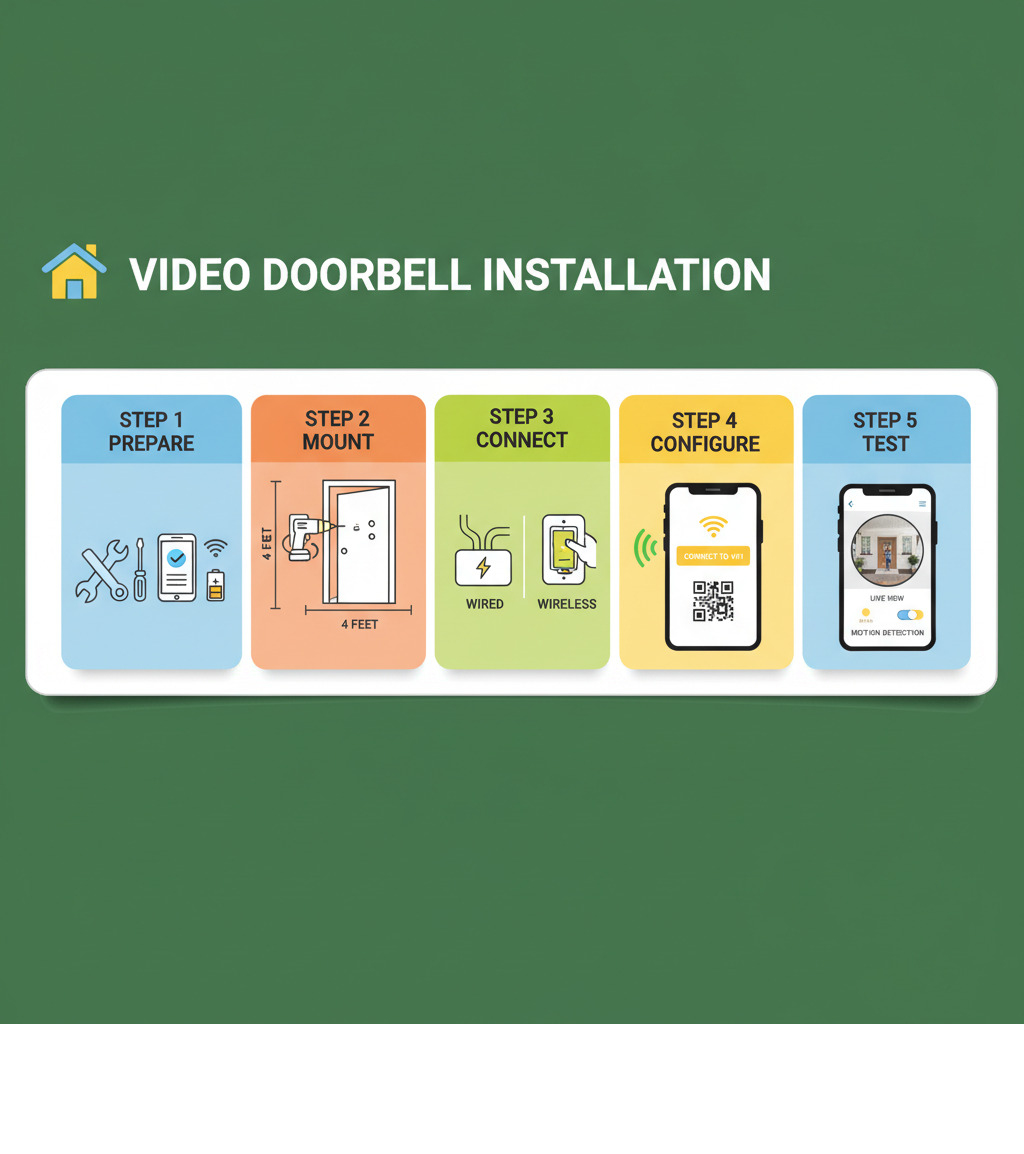
Quick Answer: Video Doorbell Setup in 5 Steps
- Prepare – Check compatibility, charge batteries (wireless), gather tools, and turn off power (wired)
- Mount – Position doorbell 4 feet high, drill holes, secure mounting bracket
- Connect – Wire connections (wired models) or simply attach unit (wireless)
- Configure – Download app, scan QR code, connect to 2.4 GHz Wi-Fi
- Test – Verify live feed, adjust motion settings, customise notifications
Installation is now remarkably straightforward. According to Consumer Reports, wireless models are “relatively easy to install—just charge their batteries, then mount them next to your door.” Wired models take about 45 minutes in most homes but require comfort with electrical work.
Success depends on understanding your doorbell type. Most homes automatically support video doorbells, which need 16 to 24 volts from existing wiring. Wireless models skip the electrical work, focusing on placement and Wi-Fi connectivity.
This guide covers everything you need to know about video doorbell setup—from choosing a model to troubleshooting, whether you’re a DIYer or prefer professional installation.
Before You Begin: Pre-Installation Checklist
A little preparation for your video doorbell setup saves you from frustrating surprises later. Before you drill the first hole, let’s walk through what you need to know.
Choosing Your Doorbell: Wired vs. Wireless
Your first decision is whether to go wired or wireless.
Wired video doorbells connect to your home’s existing doorbell wiring (typically 16-24 volts AC), providing continuous power. This means no batteries to charge, and some models can record 24/7. However, installation involves working with electricity and limits placement to where your existing wiring is.
Wireless models are simpler to install. You charge their batteries (which last one to six months), mount the unit anywhere you like, and you’re done. The downside is remembering to recharge the batteries.
Here’s how they stack up:
| Feature | Wired Video Doorbell | Wireless Video Doorbell |
|---|---|---|
| Installation | More complex, involves electrical wiring | Relatively easy, no electrical work needed |
| Power Source | Connects to existing doorbell wiring (16-24VAC) | Battery-powered, sometimes solar-powered options |
| Reliability | Consistent power, continuous recording (some models) | Relies on battery life, potential for downtime |
| Placement | Limited to existing doorbell wiring location | Flexible placement, can be installed almost anywhere |
Video doorbells pair perfectly with smart locks for comprehensive front-door security. You can explore our Smart Lock Installation Gold Coast services to upgrade your entire setup.
Essential Pre-Installation Steps for Video Doorbell Setup
Once you’ve picked your doorbell, complete these critical checks.
For wired doorbells, check compatibility. Most video doorbells need 16-24 volts AC. While most homes are in this range, some may not be. If your voltage is too low or high, you’ll need a professional electrician to replace the transformer. Also, verify your chime is compatible. Mechanical chimes (“ding-dong”) are widely supported, but digital chimes (electronic melodies) may not be. Some models require a power kit to prevent humming. Manufacturers provide detailed compatibility info, like this ecobee compatibility checker or this full chart for Nest doorbells here, for example.
Check your Wi-Fi signal strength at your front door. A stable connection is crucial. If the signal is weak, consider a Wi-Fi extender. Most video doorbells use the 2.4 GHz Wi-Fi band, not 5 GHz, because it has a longer range.
For wireless models, fully charge the battery before you begin to ensure enough power for setup and initial firmware updates.
Gathering Your Tools and Materials
Having everything ready makes installation much smoother.

For tools, you’ll need a power drill, a Phillips head screwdriver, and a level. For wired installations, needle-nose pliers and wire strippers are helpful. A multimeter ($20-$40) is a worthwhile investment to safely verify your transformer’s voltage.
Your doorbell package includes mounting screws, but you may need wall anchors for drywall or masonry. Keep wire nuts handy for extending short wires. Don’t overlook the included wedge or corner mounts; they are essential for angling the camera correctly if your doorbell is near a sidewall.
The Complete Video Doorbell Setup Process
With preparation done, it’s time to install your video doorbell setup. We’ll walk through each step, prioritising safety, especially when dealing with electricity.
For a complete surveillance system, our CCTV Camera Installation services can complement your new doorbell.
Step 1: Power Down and Remove Your Old Doorbell
If you have a wireless model, skip to the next step. For wired installations, this safety measure is critical.
Safety first: Before touching any wires, turn off the power to your doorbell at the circuit breaker. If you’re unsure which breaker it is, turn off the main one to be safe.
Once the power is off, unscrew your old doorbell button and pull it from the wall. You’ll see two wires connected to the back. Disconnect these wires. To prevent them from slipping back into the wall, tape them to the exterior wall immediately.
Step 2: Physical Mounting and Optimal Placement
Proper placement is key to getting a good view and reliable alerts.
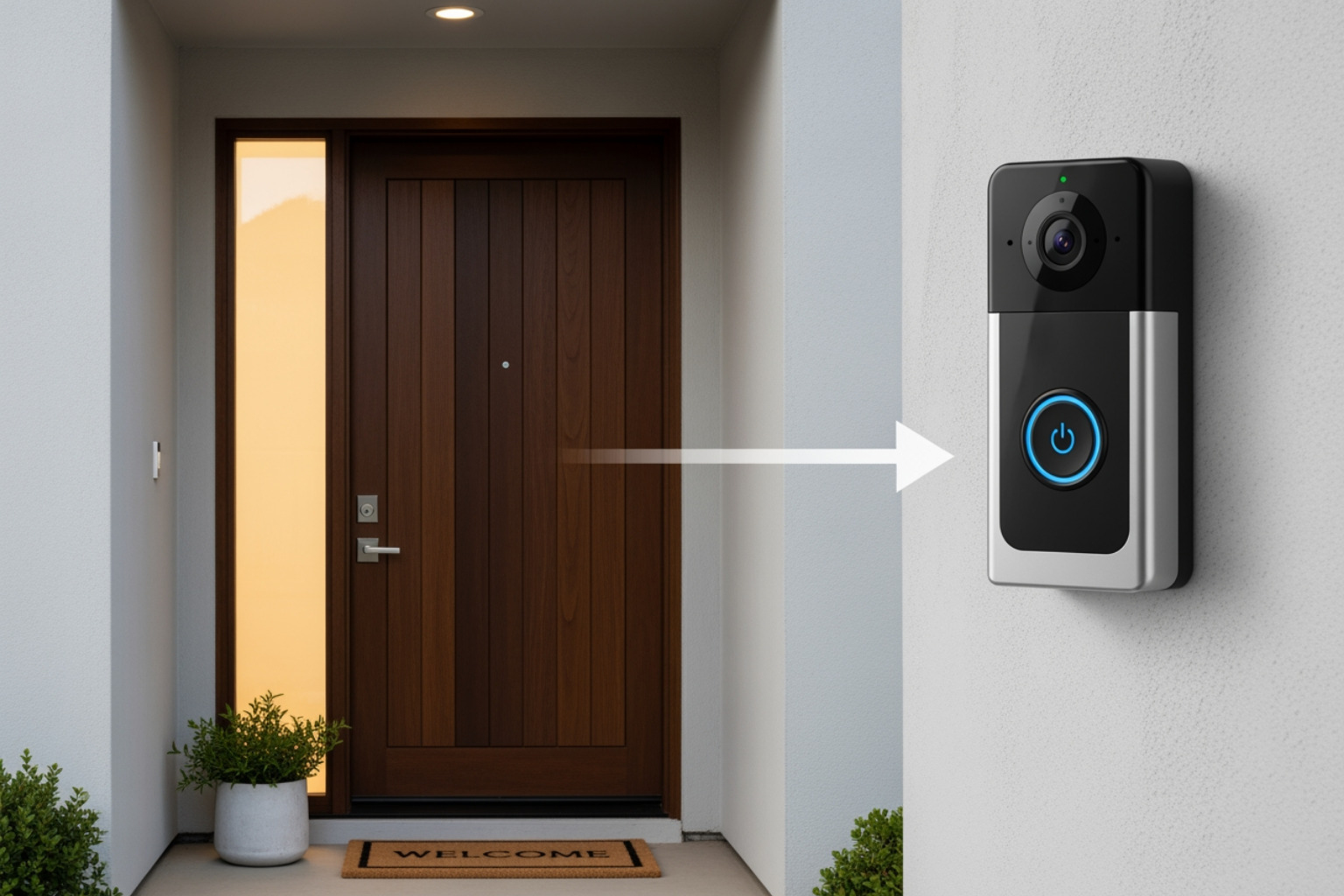
The ideal mounting height is about four feet (1.2 meters) from the ground. This captures faces clearly without being too high or too low. If a sidewall is nearby, use an included wedge or corner mount to angle the camera away from the wall and improve the motion sensor’s field of view.
Hold the mounting bracket against the wall at your chosen height, use a level to ensure it’s straight, and mark the drill holes.
- For wood: Drill small pilot holes (1/16″ or 2mm) to prevent the wood from splitting.
- For drywall, brick, or concrete: Drill larger pilot holes (7/32″ or 5.5mm) and insert the included wall anchors until they are flush with the surface.
Screw the mounting bracket into place. For wired models, connect the two wires to the terminals on the back of the doorbell—it doesn’t matter which wire goes to which terminal. Finally, attach the doorbell unit to the bracket, which usually slides and clicks into place. Secure it with the small security screw at the bottom using the provided tool.
Step 3: App and Wi-Fi Connection
Now, let’s make your doorbell smart by connecting it to your phone and home network.
Download the manufacturer’s app from your phone’s app store and create an account. The app will guide you through adding your device, typically by scanning a QR code on the doorbell or in the box. If scanning fails, you can usually enter a serial number manually.
Next, connect to your Wi-Fi. Choose your 2.4 GHz network, as most video doorbells don’t support 5 GHz. The 2.4 GHz band offers better range through exterior walls. Enter your Wi-Fi password carefully.
Your doorbell will likely perform a firmware update. This is normal and may take several minutes. Do not interrupt this process. Let it finish completely to avoid potential issues. Once the update is done, follow the final in-app prompts to name your device and complete the setup. You should now see a live video feed from your front door on your phone.
Customising Your Smart Doorbell’s Features
Installation is just the first step. Customising your doorbell’s smart features is what turns it into a powerful security tool.
Setting Up Motion Detection and Notifications
Out of the box, motion detection is often too sensitive, leading to a flood of notifications from passing cars or rustling leaves. Fine-tuning these settings is key to avoiding alert fatigue.
- Motion Sensitivity: Start by lowering the sensitivity from the default high setting. You want to catch people approaching your door, not every minor movement.
- Motion Zones: Use this feature to draw boundaries around important areas, like your walkway and porch, while ignoring high-traffic zones like the street or sidewalk.
- Smart Alerts: Many modern doorbells can distinguish between people, packages, and general motion. Activating person detection or package detection dramatically reduces false alarms while ensuring you get the alerts that matter.
Some doorbells also offer prerecorded messages, allowing you to greet visitors or instruct delivery drivers without answering the call live.
Configuring Video Storage: Cloud vs. Local
Your doorbell needs a place to store recorded video. You have two main options:
Cloud storage is the most popular choice. It uploads video clips to secure online servers, letting you view them from anywhere via the app. This convenience usually requires a monthly subscription, typically between $5 and $8, which often includes features like extended video history. Some brands offer a limited free plan.
Local storage uses a microSD card to save footage directly on the device. This avoids monthly fees and keeps your data private. The main drawbacks are limited storage capacity (older footage is overwritten) and the risk of losing your recordings if the doorbell itself is stolen.
Integrating with Your Smart Home Ecosystem
Connecting your doorbell to other smart devices creates a more powerful and convenient security system.
- Voice Assistants: Connect to Amazon Alexa and Google Home by enabling the device’s skill in the respective app. This allows you to view the camera feed on smart displays like an Echo Show or Nest Hub and receive voice announcements when someone rings the bell. For specific instructions, you can often find guides on the manufacturer’s website, like how to set up and use Amazon Alexa with an ecobee doorbell.
- Smart Hubs and Routines: For advanced automation, use IFTTT or a smart hub to create routines. For example, you can have your porch lights turn on when motion is detected or have indoor lights flash when the doorbell is pressed.
Integrating your video doorbell with other security products, like our Access Control Systems, builds a truly comprehensive defence for your home.
Troubleshooting and Professional Help
Even a well-planned video doorbell setup can encounter issues. Most problems have simple fixes, but it’s also important to know when to call a professional.
Solving Common Problems During Your Video Doorbell Setup
Here are solutions for the most frequent setup hiccups:
- Weak Wi-Fi signal: If your video is laggy or the doorbell disconnects, your Wi-Fi signal may be weak at the door. A Wi-Fi extender can boost the signal. Ensure you’re connecting to the 2.4 GHz band, which has a better range through walls than 5 GHz.
- No power to the doorbell: For wired models, first ensure the circuit breaker is back on. If it is, use a multimeter to check that your transformer is supplying 16-24 volts AC. If the voltage is outside this range, the transformer likely needs replacing.
- Chime not ringing: Confirm your chime type is compatible—many doorbells don’t work with digital chimes. If you have a mechanical chime that hums constantly, you probably need to install the included power kit or diode.
- Blurry video feed: First, remove any protective film from the camera lens and wipe it with a soft cloth. If the blurriness is intermittent, it’s likely a Wi-Fi bandwidth issue.
- App won’t connect: Make sure your phone is on the same 2.4 GHz Wi-Fi network as the doorbell. Double-check your password. Try restarting your router and doorbell. If problems persist, delete the doorbell from your app and restart the setup process. For device-specific help, check the manufacturer’s troubleshooting guide.
When to Call for Professional Installation
Knowing when to call an expert is smart, not a sign of defeat. Reach out for professional help in these situations:
- Complex or no existing wiring: If your home’s wiring is old, damaged, or non-existent, a professional can safely run new wires and ensure a proper power supply.
- Discomfort with electrical work: If you aren’t confident turning off breakers, testing voltage, or handling wires, hire a professional. Safety is paramount, especially when a transformer replacement is needed.
- Persistent technical issues: If you’ve tried all the troubleshooting steps and the doorbell still isn’t working, an expert can diagnose underlying network or electrical problems.
- Advanced system integration: A professional can ensure seamless integration if you’re connecting your doorbell to an alarm system or our advanced Access Control Systems.
At Palm Beach Locksmiths, we bring over 40 years of experience to every video doorbell setup. Our 24/7 mobile team serves the entire Gold Coast region, including Tweed, Currumbin, Burleigh, and Northern NSW, guaranteeing 100% customer satisfaction.
Frequently Asked Questions about Video Doorbell Installation
Here are answers to the most common questions we hear about video doorbell setup.
How long does it take to install a video doorbell?
Installing a video doorbell is a quick project. A wired installation typically takes about 45 minutes on average. This includes turning off the power, removing the old button, mounting the new unit, and connecting it to Wi-Fi.
Wireless models are even faster. Since there’s no electrical work, you just charge the battery, mount the unit, and connect it through the app. You can have it running in under 30 minutes.
What voltage does my video doorbell need?
Most video doorbells require 16 to 24 volts AC (VAC), which is the standard for most existing doorbell systems. This means many homes “will automatically support video doorbells.”
For example, some models like the V-4061DB can be installed with a “functional, wired, 16-24VAC mechanical doorbell system, or with a 16-24V wired transformer.” You can verify your home’s voltage with a multimeter. If your voltage is outside the required range, you’ll need a professional to replace the transformer.
Can I install a video doorbell if I don’t have existing wiring?
Yes, you have several excellent options for a video doorbell setup even without existing wiring:
- Battery-powered models: This is the simplest solution. These wireless doorbells run on rechargeable batteries that last one to six months. Just mount it and connect to your Wi-Fi.
- Plug-in transformers: Some wired models can be powered by a low-voltage transformer that plugs into a standard wall outlet near your door, providing continuous power without complex wiring.
- Professional hardwiring: If you want a permanently wired solution, an electrician or security professional can install the necessary wiring and transformer for you.
At Palm Beach Locksmiths, we handle all types of video doorbell installations, including for homes without existing wiring. Our experienced team provides 24/7 mobile service across the Gold Coast and can recommend the best solution for your home.
Conclusion
Completing your video doorbell setup is a significant upgrade to your home’s security and peace of mind. Whether you choose a flexible wireless model or a reliable wired one, you now have a digital guardian watching your doorstep, helping you screen visitors and protect deliveries.
While many installations are DIY-friendly, not everyone is comfortable with electrical work. If you encounter challenges or simply prefer a professional touch from the start, that’s what we’re here for.
Palm Beach Locksmiths has been securing homes on the Gold Coast for over 40 years. We are your trusted ‘one-stop’ security provider, offering 24/7 mobile services throughout the Gold Coast region—from Tweed and Currumbin to Burleigh, Elanora, Tugan, Miami, and into Northern NSW. We handle everything from video doorbell installations to emergency lockouts, guaranteeing 100% customer satisfaction.
For a fully integrated security solution that takes your protection to the next level, explore our advanced Access Control Systems. Welcome to smarter, safer living!